
EZ File Searcher — Cari Teks Dalam Word, Excel, PDF Offline, PercumaEZ File Searcher — Search Inside Word, Excel, PDF Offline, Free
/ 3 min read
Table of Contents
Table of Contents
Anda tahu dokumen tu wujud. Anda ingat satu ayat dalamnya — nama customer, nombor invois, serial number, hostname. Tapi nama fail? Folder mana? Tak ingat.
Search box Windows cari nama fail. Jadi akhirnya anda buka fail satu-satu.
EZ File Searcher buka semua fail dalam folder untuk anda, baca isinya, dan tunjuk di mana perkataan tu ada — line dalam log, page dalam PDF, cell dalam Excel, slide dalam PowerPoint.
Tiga langkah
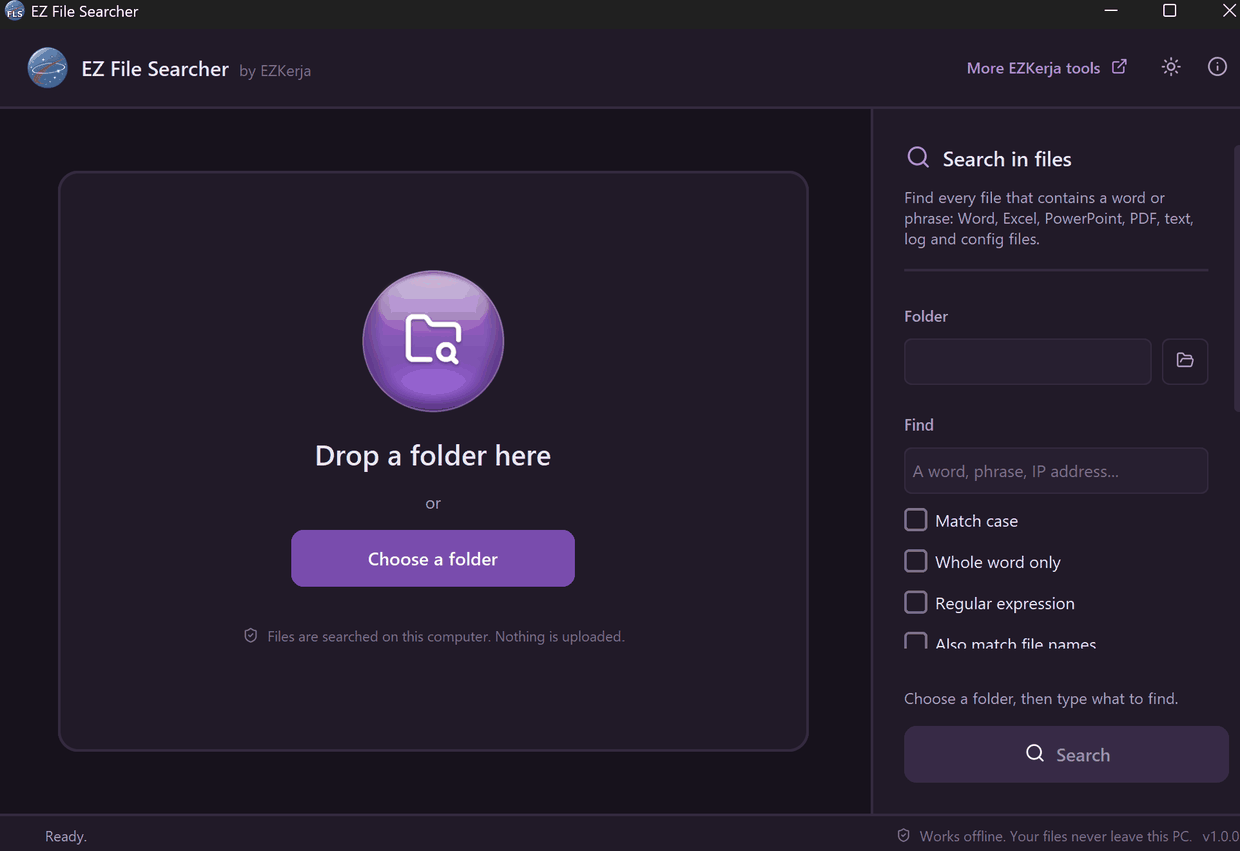
- Drag folder masuk ke dalam window, atau klik Choose a folder.
- Taip apa yang dicari — perkataan, ayat, IP address, nombor.
- Tekan Enter.
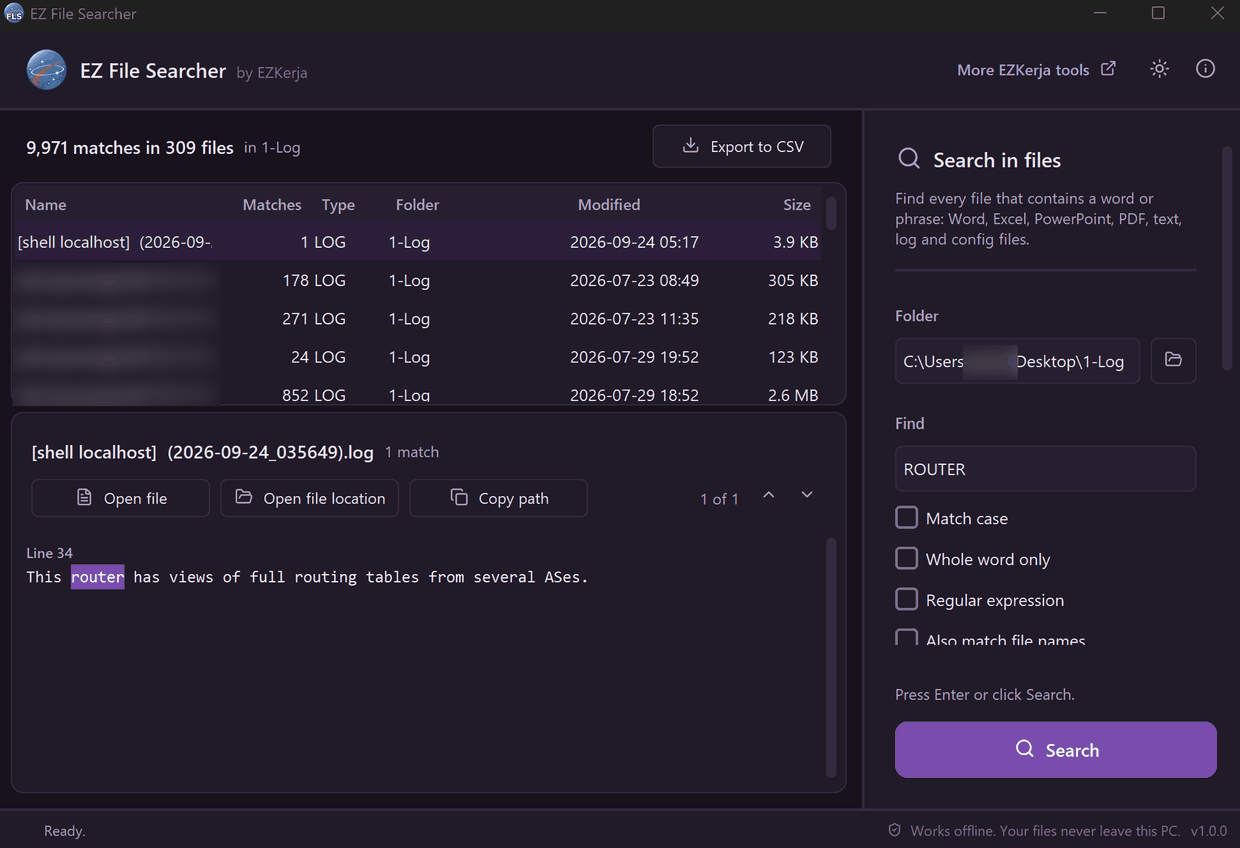
Senarai fail yang ada perkataan tu keluar sambil dia cari. Klik satu fail, dan setiap tempat perkataan tu muncul ditunjuk dengan lokasi dan di-highlight. Dalam ujian kami, folder dengan 1,108 fail log dibaca dalam 5.2 saat.
Ia baca isi fail ini
| Jenis fail | Di mana ia tunjuk perkataan tu |
|---|---|
| Word — termasuk table, text box, header, footer | Table, Header, Footer |
| Excel — setiap sheet | cell tepat, contoh 'Stock list'!B12 |
| PowerPoint — termasuk speaker notes | Slide 3 notes |
Page 7 | |
| Text, log, CSV, config, script | Line 42 |
Extension lain macam .rsc atau .tmpl boleh ditambah sendiri.
Bila dah jumpa
- Open file — buka fail tu.
- Open file location — File Explorer terus buka folder dengan fail tu dah dipilih.
- Copy path — salin path penuh untuk ticket atau email.
- Export to CSV — setiap match satu baris: fail, folder, lokasi dan teks. Terus buka dalam Excel untuk laporan.
Nak carian lebih tepat? Ada Match case, Whole word only, Regular expression, dan pilihan untuk padan nama fail sekali.
Siapa yang guna
- Admin dan office — cari nama customer, nombor PO atau invois dalam folder Word, Excel dan PDF.
- IT support — cari setting atau mesej error dalam folder log.
- Network engineer dan NOC — cari IP atau hostname dalam folder config backup dan dokumen handover. Kisah penuh ada dalam Config Mana Yang Ada IP Ni?
- Student — cari topik dalam folder nota dan slide kuliah.
Kelebihan tool ini
- 100% offline. Fail dibaca dalam PC anda. Takde upload, takde account, takde tracking.
- Read-only. Ia tak pernah ubah, pindah atau padam fail anda.
- Script tak pernah di-run. Klik hasil
.bat,.ps1atau.reg— ia dibuka dalam Notepad. - Jujur pasal fail yang dilangkau. Fail berpassword, rosak, scanned PDF atau OneDrive online-only disenaraikan berserta sebab — bukan senyap-senyap hilang dari hasil.
- Tak perlu admin rights, sama ada installer atau versi portable.
Had tool ini
- Format Office lama (
.doc,.xls,.pptdan Outlook.msg) tak dibaca. Save as format baru dulu. - Scanned PDF takde teks — takde OCR. Ia disenaraikan sebagai “scanned PDF”.
- Takde index. Ia baca fail setiap kali anda cari. Kalau anda cuma nak cari nama fail, Everything Search lebih laju — tool ni untuk apa yang ada di dalam fail.
- Windows 10/11 sahaja.
- Belum code-signed. Windows SmartScreen mungkin bagi amaran kali pertama — klik More info → Run anyway. Dua engine di VirusTotal (Arctic Wolf dan DeepInstinct) menandakan installer ni sebagai berisiko; itu false positive yang biasa untuk app Python yang belum signed. Page download tunjuk SHA-256 dan laporan VirusTotal untuk anda semak.
Cara dapatkan
- Pergi ke page download EZ File Searcher.
- Klik Download Installer (.exe), double-click, Next sampai siap.
- Buka EZ File Searcher dari Start menu, drag folder masuk, dan cari.
Tak nak install? Ada versi portable (zip) di page yang sama.
Percuma sepenuhnya. Takde licence key, takde account, takde limit.
Download EZ File Searcher — atau WhatsApp kami kalau ada soalan, Bahasa Melayu atau English.
You know the document exists. You remember one line from it — a customer name, an invoice number, a serial number, a hostname. But the file name? Which folder? No idea.
The Windows search box looks for file names. So you end up opening files one by one.
EZ File Searcher opens every file in the folder for you, reads what is inside, and shows you where the word is — the line in a log, the page in a PDF, the cell in Excel, the slide in PowerPoint.
Three steps
- Drag a folder into the window, or click Choose a folder.
- Type what you are looking for — a word, a phrase, an IP address, a number.
- Press Enter.
The files that contain it appear while it searches. Click one, and every place the word appears is shown with its location, highlighted. In our test, a folder of 1,108 log files was read in 5.2 seconds.
It reads inside these files
| File type | Where it shows the match |
|---|---|
| Word — including tables, text boxes, headers, footers | Table, Header, Footer |
| Excel — every sheet | the exact cell, e.g. 'Stock list'!B12 |
| PowerPoint — including speaker notes | Slide 3 notes |
Page 7 | |
| Text, logs, CSV, config files, scripts | Line 42 |
You can add your own extensions such as .rsc or .tmpl.
Once you’ve found it
- Open file — opens the file.
- Open file location — File Explorer opens the folder with the file already selected.
- Copy path — copies the full path for a ticket or an email.
- Export to CSV — every match as a row: file, folder, location and text. Opens straight in Excel for a report.
Need a more precise search? There is Match case, Whole word only, Regular expression, and an option to match file names too.
Who uses it
- Admins and office staff — find a customer name, a PO or invoice number in folders of Word, Excel and PDF files.
- IT support — find a setting or an error message in a folder of logs.
- Network engineers and NOC — find an IP or hostname in config backups and handover documents. The full story is in Which Config Has This IP?
- Students — find a topic across a folder of lecture notes and slides.
What it promises
- 100% offline. Files are read on your PC. No upload, no account, no tracking.
- Read-only. It never changes, moves or deletes your files.
- Scripts are never run. Click a
.bat,.ps1or.regresult and it opens in Notepad. - Honest about skipped files. Password-protected, damaged, scanned or OneDrive online-only files are listed with the reason — instead of quietly missing from the results.
- No admin rights needed, for the installer or the portable version.
Honest: what it doesn’t do
- Old Office formats (
.doc,.xls,.pptand Outlook.msg) are not read. Save them in the newer format first. - Scanned PDFs have no text — there is no OCR. They are listed as “scanned PDF”.
- No index. It reads the files every time you search. If you only need to find file names, Everything Search is faster — this tool is for what is inside the files.
- Windows 10/11 only.
- Not code-signed yet. Windows SmartScreen may warn you the first time — click More info → Run anyway. Two engines on VirusTotal (Arctic Wolf and DeepInstinct) flag the installer; that is a common false positive for Python apps that aren’t signed yet. The download page shows the SHA-256 and the VirusTotal report so you can check.
How to get it
- Go to the EZ File Searcher download page.
- Click Download Installer (.exe), double-click it, click Next until done.
- Open EZ File Searcher from the Start menu, drag a folder in, and search.
Don’t want to install? There is a portable (zip) version on the same page.
Completely free. No licence key, no account, no limits.
Download EZ File Searcher — or WhatsApp us with any questions, in Malay or English.