
What Is a Subnet Mask? How to Read /27 and /22 Fast
/ 12 min read
Table of Contents
It is 1:40am
, you are twenty minutes into a change window, and the ticket says the new management
VLAN is 192.168.10.0/27. Someone on the call asks how many devices will fit. You know a /27 is
“smaller than a /24”. You start counting on your fingers.
That pause is the problem. Not because the maths is hard — it is genuinely easy once you see it — but because at 1:40am , with a rollback deadline and someone waiting on the bridge, you will take the first number that sounds right. And if that number is wrong, you do not find out now. You find out when the 31st device goes in next month and nothing works, and by then nobody remembers that the subnet was sized by a guess.
So let us fix the guess. By the end of this you will be able to read any mask in a few seconds, say how many usable addresses it gives, sanity-check it before you commit anything, and recognise the symptoms of a mask that is wrong — which is the half nobody teaches, because a wrong mask does not announce itself.
What the mask is actually for
An IP address on its own does not tell you anything about where it lives. 192.168.10.45 could be
one of 256 addresses on a flat office LAN, or one of 30 on a small management segment. The address
does not know. The mask is what decides.
Think of the address as a street name plus a house number. The mask is the line that says where the street name ends and the house number begins. Everything on the left is the network part — shared by every device on that segment. Everything on the right is the host part — unique to each device.
That single split is what every device uses to answer one question, thousands of times a second:
Is this destination on my own segment, or do I hand it to my gateway?
If the destination is inside its own network part, the device ARPs for it and talks to it directly. If it is outside, the device sends the packet to its default gateway instead. A wrong mask does not corrupt anything. It makes the device answer that one question wrongly — which is worse, because wrong answers are quiet.
Reading the notation: /24, /27, /30
255.255.255.0 and /24 are the same thing written two ways. The number after the slash is simply
how many bits belong to the network part, out of 32.
/24→ 24 network bits → 8 host bits left/27→ 27 network bits → 5 host bits left/30→ 30 network bits → 2 host bits left
More network bits means a smaller segment. That is the whole trade: you are moving the fence to the right, taking bits away from hosts and giving them to the network.
Here is the part worth memorising. This table is for masks inside the last octet — /24 to /30. Bigger blocks work the same way but in a different octet, and there is a section on that below.
| CIDR | Dotted mask | Total addresses | Usable | Block size |
|---|---|---|---|---|
| /24 | 255.255.255.0 | 256 | 254 | 256 |
| /25 | 255.255.255.128 | 128 | 126 | 128 |
| /26 | 255.255.255.192 | 64 | 62 | 64 |
| /27 | 255.255.255.224 | 32 | 30 | 32 |
| /28 | 255.255.255.240 | 16 | 14 | 16 |
| /29 | 255.255.255.248 | 8 | 6 | 8 |
| /30 | 255.255.255.252 | 4 | 2 | 4 |
You do not have to memorise the table to survive without it. Two shortcuts reproduce it:
Total addresses = 2 to the power of the host bits. A /27 has 5 host bits, and 2⁵ = 32.
Block size = 256 minus the interesting octet of the mask. For anything from /24 to /30 the
interesting octet is the last one: a /27 is ...224, and 256 − 224 = 32. Same answer, and this one
also tells you where the subnets start, which is the half most people skip.
Usable is not total — this is the off-by-one that bites everyone
Thirty-two addresses in a /27 does not mean thirty-two devices. Two of them are not usable as host addresses:
- the network address — the first address in the block, the block’s own name
- the broadcast address — the last address in the block
So a /27 gives 30 usable addresses. A /29 gives 6, not 8. A /30 gives 2, not 4.
This is the single most common subnetting mistake in real work, and it hurts most at the small end. On a /24 being wrong by two out of 256 rarely matters. On a /29 for a customer handover, being wrong by two out of eight is a quarter of the subnet — and it is usually discovered by the field engineer standing at the site, not by you.
Worth knowing as the exception: on point-to-point links some platforms support a /31, which uses
both addresses and gives you two usable ends with no waste (RFC 3021). Support varies by vendor and
platform, so confirm it on the box you are actually configuring rather than assuming. A /32 is a
single host address, used for loopbacks and host routes.
Where the subnets start — the block size method
This is the skill that separates “I know what /27 means” from “I can plan with /27”.
Take 192.168.10.0/24 and cut it into /27s. Block size is 32, so the subnets begin at every
multiple of 32:
192.168.10.0/27 → usable .1 – .30 broadcast .31192.168.10.32/27 → usable .33 – .62 broadcast .63192.168.10.64/27 → usable .65 – .94 broadcast .95192.168.10.96/27 → usable .97 – .126 broadcast .127...and so on to 192.168.10.224/27Eight subnets of 30 usable addresses each. Now the useful trick in reverse — someone gives you a host address and asks which segment it belongs to:
Which subnet does
192.168.10.45/27sit in?
Block size 32, so the boundaries are 0, 32, 64, 96… The value 45 falls between 32 and 63. So:
- network address:
192.168.10.32 - usable range:
192.168.10.33–192.168.10.62 - broadcast:
192.168.10.63
No binary, no long division. Find the block size, find the two multiples it falls between, done. That is the calculation you can do on the call without asking anyone to wait.
A detail that follows from this: 192.168.10.40/27 is not a valid network address. It is a host
inside the .32 block. Writing it into a design document as a subnet is the kind of error that
passes three reviews because it looks fine, and then the interface refuses the command or, worse,
quietly accepts the host address and you have documented something that does not match the device.
When the mask is bigger than a /24
Everything above lived in the last octet, because that is where most people meet subnetting. Real
ISP and enterprise addressing does not stay there. You will be handed a /22, a /20, a /16, and
if you try to apply “256 minus the last octet” to 255.255.252.0 you get 256 − 0 = 256 and a
nonsense answer.
The rule does not change. What changes is which octet you apply it to.
Find the interesting octet — the one where the mask is neither 255 nor 0. Everything to its left is fixed, everything to its right is host space, and the block size is 256 minus that octet.
Take 255.255.252.0, a /22:
- interesting octet: the third (252)
- block size: 256 − 252 = 4, counted in the third octet
- so the subnets start at third-octet values 0, 4, 8, 12, 16…
10.20.0.0/22 → 10.20.0.0 – 10.20.3.25510.20.4.0/22 → 10.20.4.0 – 10.20.7.25510.20.8.0/22 → 10.20.8.0 – 10.20.11.255Each /22 covers four whole /24s: 4 × 256 = 1,024 addresses, 1,022 usable. The other shortcut agrees — a /22 leaves 10 host bits, and 2¹⁰ = 1,024.
Now the same reverse question as before. Which /22 does 10.20.6.45 belong to? The third octet is
6, the boundaries are 0, 4, 8, so 6 falls in the block that starts at 4:
- network address:
10.20.4.0 - usable range:
10.20.4.1–10.20.7.254 - broadcast:
10.20.7.255
Notice the broadcast is not in the same /24 as the network address. That surprises people the first
time, and it is why a /22 allocation split across a documentation sheet by /24 rows is so easy to
get wrong — the block does not respect the dots.
The full chart, /0 to /32
Here is every prefix in one place. Worth saving to your phone for the nights when you want to confirm a number rather than work it out.
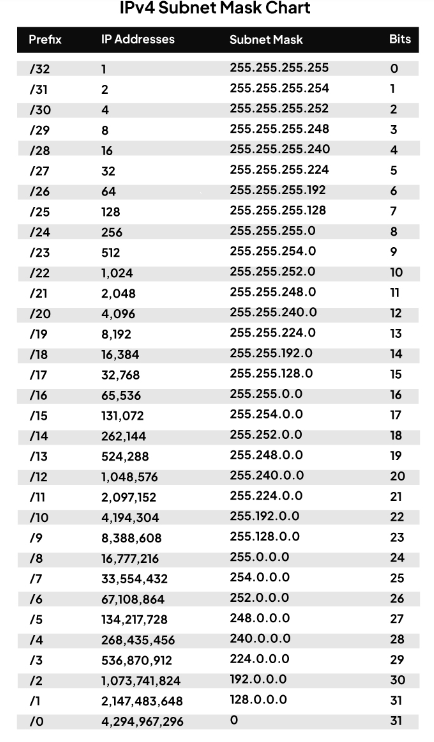
Two things to read it correctly:
- IP Addresses is the total in the block. For usable host addresses on an ordinary segment, subtract 2 — a /27 shows 32, and gives you 30.
- Bits is the number of host bits — 32 minus the prefix. It is the power of 2 behind the address count: a /27 has 5 host bits, and 2⁵ = 32.
You will not hand out anything bigger than a /8 on a real network, but the bottom rows are useful
for reading route tables and summaries — and /0 is the default route, 0.0.0.0/0.
How a mask mismatch actually shows up
Here is what makes masks worth taking seriously, and it is why I would rather you remember this section than the table.
Suppose a server is configured 192.168.10.45/24, but the gateway interface for that segment is
192.168.10.33/27. Both devices are plugged in. Both are “configured”. Neither logs an error.
Now the server wants to reach 192.168.10.200. With a /24 mask, the server believes that address is
on its own segment, so it ARPs for it directly instead of sending it to the gateway. If .200 is
really on a different /27 behind the router, nobody answers the ARP, and the traffic goes nowhere.
Meanwhile everything else keeps working. Hosts inside its own /27 are fine. Anything outside
192.168.10.x goes to the gateway as normal, so that is fine too. Only the other 192.168.10.x
segments are broken — which is exactly the kind of partial failure that makes people look
everywhere except the mask.
The ticket that arrives from this does not say “mask mismatch”. It says “sometimes it works”, or “it works from the office but not from the other site”. Partial, direction-dependent, intermittent symptoms. Engineers can lose an afternoon to that, chasing a firewall rule or a routing problem, because the configuration on both ends looks correct at a glance.
So when connectivity is strange rather than dead, check the masks on both ends early. It costs you thirty seconds and it is a disproportionately common cause.
Where to actually look
All of this assumes you can find the mask in the first place, and on a bad night that is its own small obstacle. Three places cover almost everything:
- A Windows host —
ipconfigprints the address and the subnet mask in dotted form. This is what you ask a customer to run, because it needs no admin rights and no explanation. - A Linux host —
ip addr showprints it in CIDR form,192.168.10.45/24, address and mask in one string. - A network device — the mask lives on the interface, so look at the interface configuration
rather than a summary table. On a Cisco IOS example that is
show running-config interface GigabitEthernet0/1. Other vendors word it differently; the point is that a summary view may show you the address and not the mask, and the mask is the half you are checking.
When you are chasing the mismatch described above, get that output from both ends before forming an opinion. Half the ticket is usually solved the moment the two masks are written down next to each other.
The sanity check before you commit
Four questions. They take under a minute and they catch most real mistakes:
- What is the block size? 256 minus the interesting octet of the mask — the octet that is neither 255 nor 0. This is the number everything else comes from.
- Is my network address actually on a boundary? It must be a multiple of the block size. If it is not, it is a host address and the design is wrong.
- Does the gateway live inside the same block as the hosts? And is the mask on the gateway identical to the mask on the hosts? Same subnet, same mask, both ends.
- How many usable addresses, and how many do I need a year from now? Usable = total − 2 on any
ordinary segment — the
/31point-to-point case above is the one exception. If today’s requirement is 28 devices in a /27, you have two spare. Ask whether that is a plan or a coincidence.
One more habit worth building: when you size a segment, write down the usable range in the change
document — not just 192.168.10.32/27, but .33 to .62, gateway .33, broadcast .63. The next person
to touch it at 2am will be you, and you will not want to redo the arithmetic.
What to take away
A subnet mask is not a textbook topic you pass and forget. It is a line between the network part and the host part of an address, and it is the thing every device uses to decide whether to talk directly or hand the packet to its gateway. Read it with the block size method — applied to whichever octet is the interesting one — remember that usable is total minus two on every ordinary segment, and check that both ends agree before you commit.
Do that and the 1:40am question stops being a guess.
Where EZKerja fits
Subnet maths is the textbook example of work that is easy, mechanical, and done at exactly the wrong time of night. Knowing how to do it by hand is not optional — you cannot review a design you cannot calculate. But doing it by hand forty times while planning an addressing scheme is not skill, it is just repetition, and repetition under time pressure is where errors come from.
That is the kind of task the EZKerja Network Engineer Toolkit is being built for: subnet, VLSM, range and mask calculation, so the arithmetic is one step instead of forty, and your attention stays on whether the design is right. If you want to see how to spot more work like this in your own week, read Stop Doing Repetitive Work Manually.
Try it yourself
Work through the /27 example above by hand once, then do the /22 one — that is the part worth
owning. If subnet calculation is a daily part of your kerja and you want to know when the Network
Engineer Toolkit is ready, ask on WhatsApp below.