
EZ Text Compare
Compare two text, log or config files and see which lines were added, removed or changed — even when lines moved. Offline on your own Windows PC. Free.
- v1.0.0
- Windows 10/11
- Updated 15 Oct 2026
Download
Download Installer (.exe) 14.8 MB- Portable (zip) 18.6 MB Unzip anywhere and run — nothing to install.
Is it safe? Check it yourself
- VirusTotal checks a file with 70+ antivirus engines at once, free.
-
Make sure your file is the one we published. Its SHA-256 fingerprint must match:
- EZ-Text-Compare-Setup-1.0.0.exe
d0c7eca2b334d2c531d8fb69e4f5e804211592d64ee7dcfc995de709e9936437 - EZ-Text-Compare-1.0.0-portable.zip
6ba302ecff1ce36d1966ddcbcddcbcf9df2985b4fd75f2233f996c2e3b0babff
On Windows, open PowerShell in your Downloads folder and run:
Get-FileHash .\EZ-Text-Compare-Setup-1.0.0.exe -
- The program is not code-signed yet, so Windows SmartScreen may say "Windows protected your PC". Click More info → Run anyway. That warning is about the missing signature, not a virus.
EZ Text Compare
Drop two text, log or config files and see which lines were added, removed or changed — with the exact characters that changed highlighted. Offline, on your own PC. No account. Free.
Bandingkan dua fail text, log atau config — nampak terus line mana yang ditambah, dibuang atau berubah. Terus dalam PC anda, takde upload, percuma.
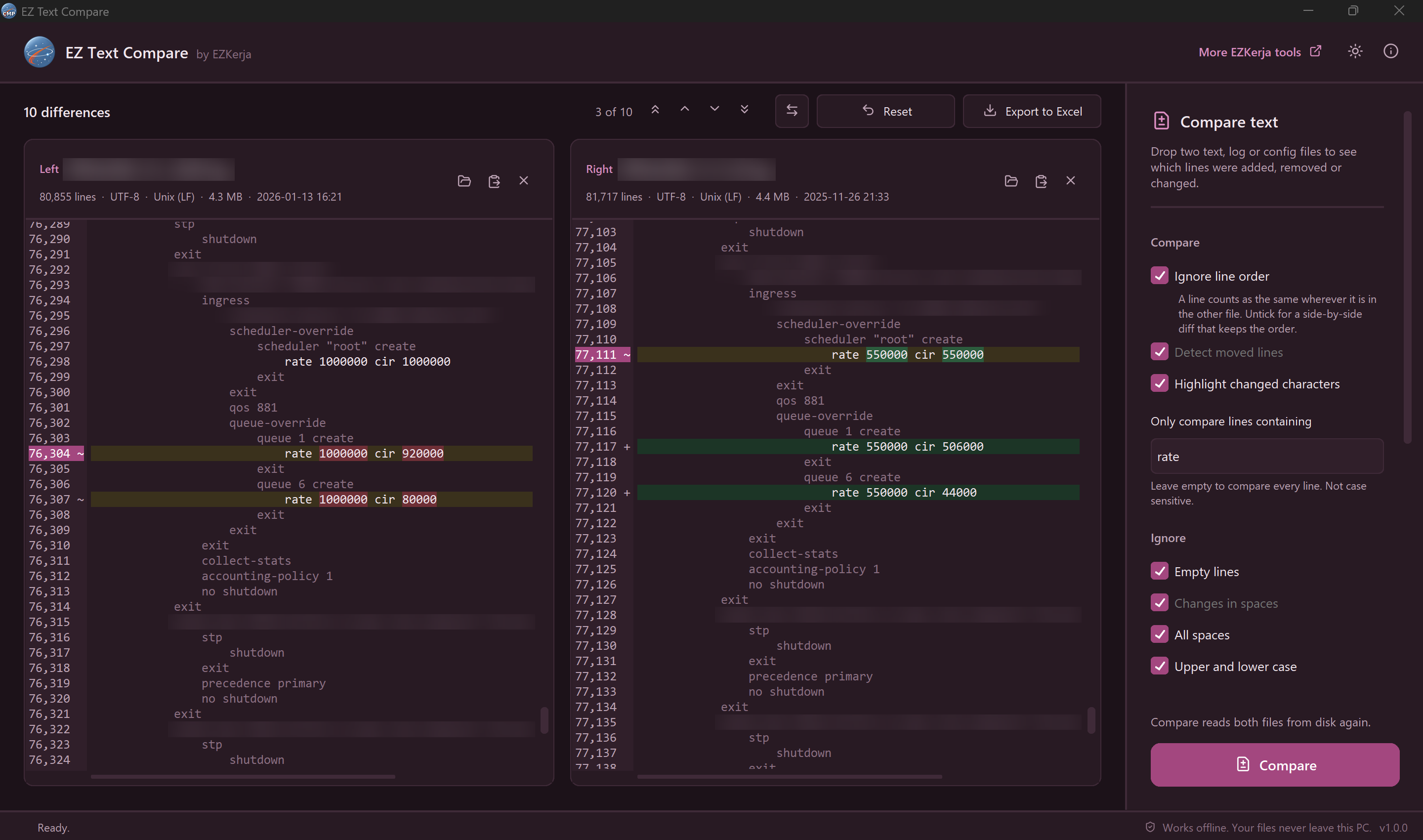
Two 80,000-line router configs, compared on the lines containing rate only. Changed values are
highlighted: amber lines changed, green lines are only in the newer file. (Identifying details are
blurred.)
Why this exists
You have yesterday’s log and today’s. Or the config before the change window and after it. The question is always the same: what is different?
Opening both in an editor and reading them side by side is slow. A classic diff answers a different question — it cares about line order, so when a block of lines moved, or a device printed its output in a different order, it reports a wall of red and green.
EZ Text Compare answers the question you actually have. By default it ignores line order: a line counts as the same wherever it is in the other file. What is left is either changed (a similar line exists on the other side, such as the same interface with a new IP address) or only in one file.
What it does
| Drop two files, then click Compare | The older one goes on the left, the newer on the right automatically. Or open them one at a time, or paste text from the clipboard — handy for command output copied from a terminal. Nothing is compared until you click Compare; Reset clears both sides to start again. |
| Only the lines you care about | Type a word in Only compare lines containing — for example interface — and every other line is left out. Not case sensitive. |
| Ignore line order | On by default. Untick it for a classic side-by-side diff that keeps the order, lines both sides up, and detects moved lines. |
| Changed characters | In a changed line only the part that changed is highlighted: 10.1.1.1 → 10.1.1.25 marks just 1 → 25. Click a changed line to jump to its partner. |
| Ignore the noise | Empty lines, changes in spaces, all spaces, upper and lower case, dates and times (so two logs from different days compare by content), or any regular expression. |
| Move between differences | Next, previous, first and last — with buttons or F3 / Shift+F3 and Alt+Up / Alt+Down. Or show only the differences. |
| Export to Excel | One row per difference with both sides, plus a summary sheet. Ready for a change report. |
What it promises
- 100% offline — no upload, no account, no tracking
- Read-only — it never changes your files
- Honest about what it saw — if the two files use different line endings or encodings, it says so instead of reporting every line as different
- Stays responsive on big files, with a Stop button
- No admin rights needed — for the installer or the portable zip
- Dark mode and keyboard shortcuts
Download and run
Installer — recommended
- Click Download Installer (.exe) above.
- Double-click
EZ-Text-Compare-Setup-1.0.0.exeand click Next through the steps. It installs into your own user folder, so no admin rights are needed. - Open EZ Text Compare from the Start menu.
Portable (zip) — nothing to install
- Click Portable (zip) above, right-click the zip → Extract All.
- Double-click
EZ Text Compare.exe. Keep the_internalfolder next to it.
Windows protected your PC? The program is not code-signed yet, so Windows SmartScreen may warn you the first time. Click More info → Run anyway. The download box above shows how to check the file with VirusTotal and its SHA-256 fingerprint.
About the VirusTotal result
Two engines on VirusTotal flag the installer: Arctic Wolf (“Unsafe”) and DeepInstinct (“Malicious”). Every other engine reports no threat. These are false positives. Both engines use machine learning to guess from how a file is built, not from known malware. Programs made with PyInstaller (a common tool for packaging Python apps) that are not code-signed yet, like this one, often get flagged this way. EZ Text Compare only reads the two files you give it. It never changes them and never sends anything over the internet, and its full source code is public on GitHub. If you want to be sure, check the SHA-256 fingerprint in the download box above against the VirusTotal report.
How to use it
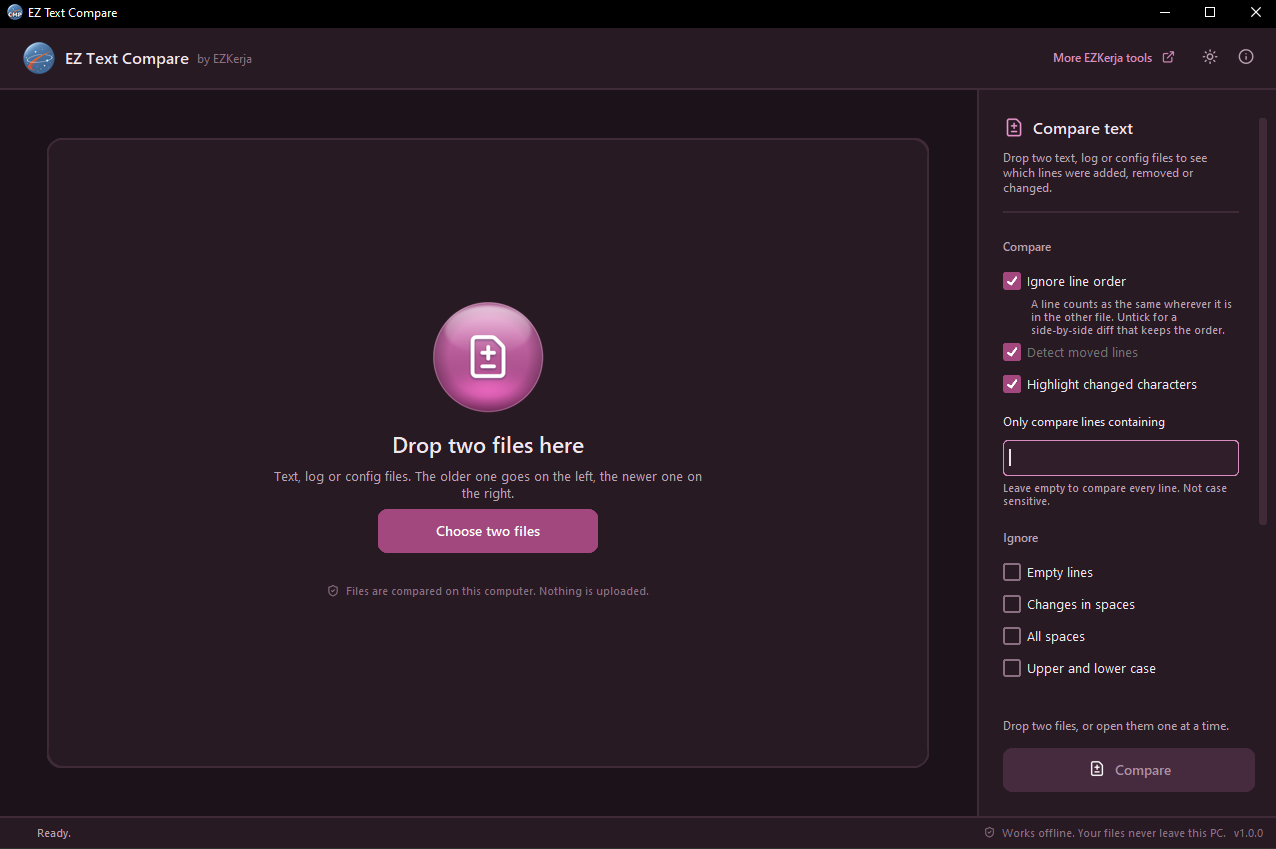
- Drag both files into the window (or click Choose two files).
- Tick any options on the right. To compare only some lines, type a word in Only compare lines containing.
- Click Compare (or press F5). Red lines are only in the left file, green only in the right, amber changed, blue moved.
- Use the arrows (or F3) to step through the differences. Click a changed line to see its partner.
- Changed an option? Click Compare again. Reset clears both files to start over.
- Export to Excel to keep the result.
Requirements
- Windows 10 or Windows 11 (64-bit)
- No admin rights, no internet connection
Honest limits
- Windows only.
- Text files only. It does not compare Word, Excel or PDF files, folders, or images.
- Files up to 50 MB each.
- Very different large files are slower. Two 20,000-line logs where every line differs took 16 seconds on a small test computer (an Orange Pi; an office laptop is several times faster). On files that big it compares each leftover line only with lines in a similar place, and says so. With dates and times ignored, the same files took about 1 second.
- It does not merge or edit. WinMerge and Notepad++ (with its Compare plugin) can edit both sides and copy changes across, compare folders, and integrate with Git. This tool only shows the differences, and is built to be quick for that one job.
- No Git or SVN integration, and no comparing selections of a file.
- Not code-signed yet, so expect the SmartScreen warning above.
Cara guna (BM)
Installer (disyorkan): klik Download Installer (.exe) di atas, double-click
EZ-Text-Compare-Setup-1.0.0.exe dan klik Next sampai siap. Tak perlu admin rights.
Portable (zip): klik kanan fail zip → Extract All, kemudian double-click
EZ Text Compare.exe.
Lepas tu, drag dua fail masuk ke dalam app. Fail yang lebih lama akan diletakkan di kiri, yang baru di kanan. Klik Compare untuk mula banding — app tak akan banding sendiri. Merah = ada dalam fail kiri sahaja, hijau = ada dalam fail kanan sahaja, kuning = line yang berubah. Guna anak panah (atau F3) untuk pergi ke perbezaan seterusnya.
Untuk log, tick Dates and times supaya masa pada setiap line tidak dikira sebagai perbezaan.
Nak banding line tertentu sahaja? Taip perkataan dalam Only compare lines containing (contoh
interface) — line lain tidak dibanding. Huruf besar atau kecil tak kisah. Reset kosongkan
kedua-dua fail untuk mula semula.
Pasal keputusan VirusTotal: dua engine (Arctic Wolf dan DeepInstinct) menandakan installer ini sebagai berisiko, engine lain semua bersih. Itu false positive: kedua-dua engine guna machine learning untuk meneka berdasarkan cara fail dibina, bukan malware yang dikenal pasti. App Python yang dibungkus dengan PyInstaller dan belum code-signed memang kerap disalah tanda begini. Source code penuh ada di GitHub, dan anda boleh semak SHA-256 fail dengan laporan VirusTotal di kotak download.
Semua perbandingan berlaku dalam PC anda. App ini hanya membaca fail — ia tidak pernah mengubah apa-apa.
License
Free to use. MIT licence. Third-party component licences are in the licenses folder inside the
app.
Questions
Ask on WhatsApp — the button is below. Malay or English, both fine.