
EZ Text Compare — Banding Dua Fail Text & Log Offline, PercumaEZ Text Compare — Compare Two Text & Log Files Offline, Free
/ 4 min read
Table of Contents
Table of Contents
Anda ada fail semalam dan fail hari ini. Config sebelum change dan selepas change. Log dari dua server yang sepatutnya sama. Soalannya sentiasa sama: apa yang berbeza?
Baca dua-dua line by line memang boleh — untuk 30 line. Untuk 3,000 line, tak.
EZ Text Compare banding dua fail untuk anda dan tunjuk terus line mana yang ditambah, dibuang atau berubah — dengan bahagian yang berubah di-highlight.
Tiga langkah
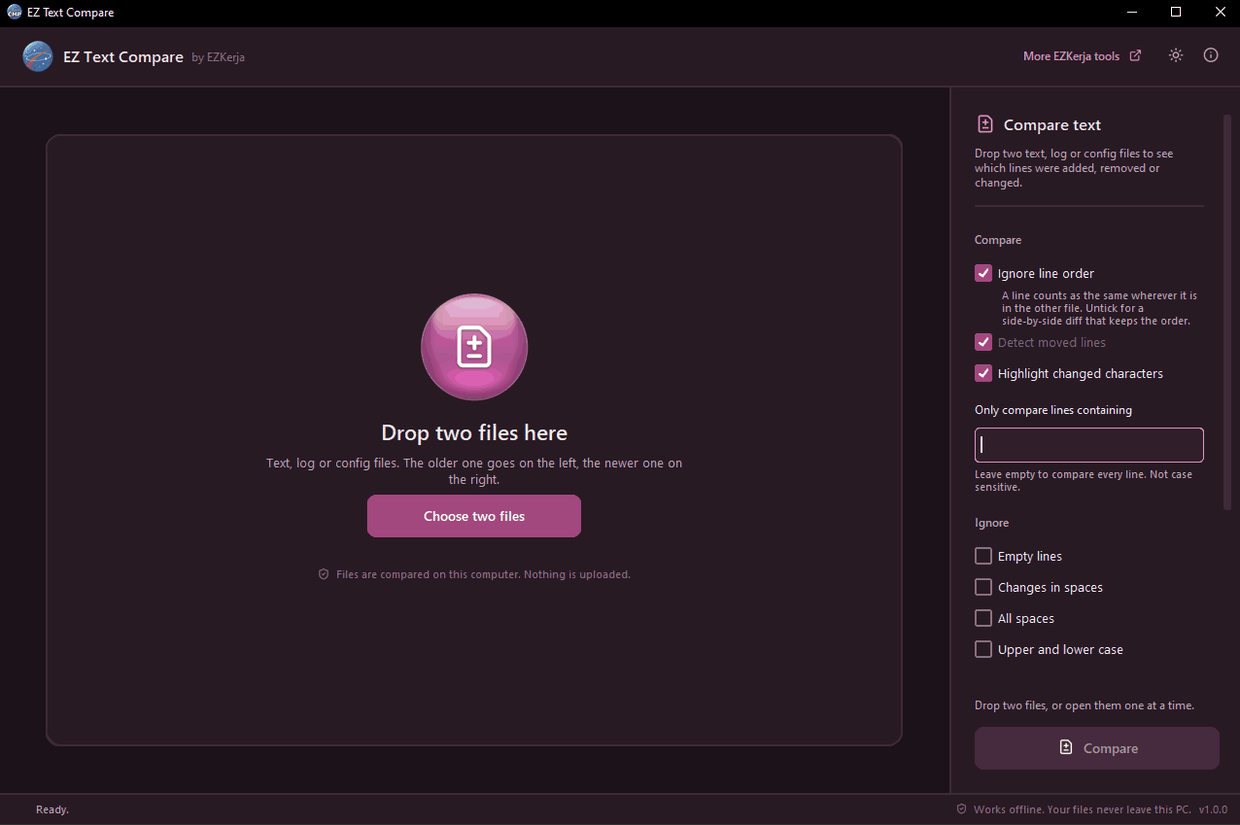
- Drop dua fail ke dalam window. Fail yang lebih lama diletakkan di kiri, yang baru di kanan, secara automatik. Atau buka satu-satu, atau paste text terus dari clipboard — senang untuk output yang anda copy dari terminal.
- Tick pilihan yang perlu di sebelah kanan.
- Klik Compare (atau tekan F5).
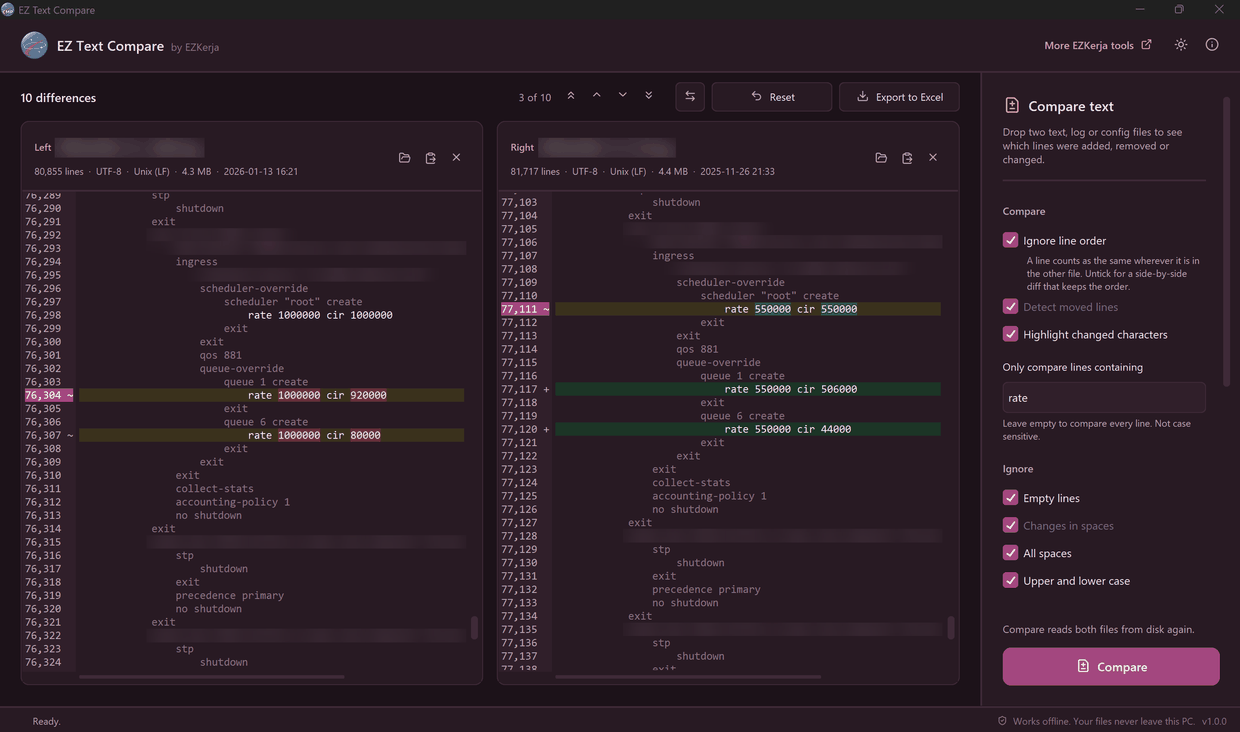
Merah = ada dalam fail kiri sahaja. Hijau = ada dalam fail kanan sahaja. Kuning = line yang
berubah, dengan perkataan yang berubah sahaja ditanda: 10.1.1.1 → 10.1.1.25 tanda 1 → 25.
Banding ikut isi, atau ikut susunan
- Ignore line order (default) — line dikira sama di mana-mana pun ia berada dalam fail satu lagi. Sesuai untuk kebanyakan config dan log, sebab device dan tool selalu susun semula output. Satu block yang beralih tempat tak lagi memenuhi skrin dengan warna merah dan hijau.
- Ikut susunan — untick pilihan tu untuk diff side by side yang klasik, kedua-dua belah scroll sekali. Detect moved lines tanda line yang berpindah sebagai “moved”, bukan dibuang dan ditambah. Guna ni untuk ACL, route-map atau firewall policy, di mana susunan adalah maksudnya.
Kenapa dua cara ni penting diterangkan penuh dalam Config Sebelum dan Selepas Change: Apa Sebenarnya Yang Berubah?
Buang noise, fokus pada yang penting
- Only compare lines containing — taip
rate,interface,vlanatau apa saja. Line lain diabaikan. Huruf besar atau kecil tak kisah. Dalam ujian kami, dua config 80,855 dan 81,717 line dibanding pada lineratesahaja — 10 perbezaan, terus nampak. - Ignore — empty line, beza space, huruf besar/kecil, dates and times (supaya log dua hari berlainan dibanding ikut isi, bukan masa), atau regular expression sendiri.
Bila dah nampak perbezaan
- Pergi ke perbezaan seterusnya — first, previous, next, last, dengan butang atau F3 / Shift+F3.
- Klik line yang berubah — line pasangannya di sebelah sana terus ditunjuk.
- Show only differences — sembunyikan line yang sama.
- Export to Excel — satu baris untuk setiap perbezaan, kedua-dua belah, dan sheet summary. Sedia untuk laporan change.
- Swap sides dan Reset untuk mula semula.
Siapa yang guna
- Network engineer dan NOC — config sebelum dan selepas change window,
showoutput dua device, log semalam dan hari ini. - IT support dan admin — dua versi fail setting, senarai user atau export CSV.
- Student IT — semak output lab dengan jawapan, atau dua versi assignment.
Kelebihan tool ini
- 100% offline. Fail dibaca dalam PC anda. Takde upload, takde account.
- Read-only. Ia tak pernah ubah fail anda.
- Jujur pasal fail. Kalau dua fail guna line ending atau encoding lain, ia beritahu — bukan tanda setiap line sebagai berbeza.
- Source code terbuka di GitHub.
Had tool ini
- Ia tak edit atau merge. WinMerge dan Notepad++ dengan plugin Compare boleh edit kedua-dua belah, salin perubahan, banding folder dan integrate dengan Git. Tool ni hanya tunjuk perbezaan — dibuat untuk laju pada satu kerja tu.
- Text file sahaja, sampai 50 MB setiap fail. Tak banding Word, Excel atau PDF.
- Windows 10/11 sahaja.
- Belum code-signed. Windows SmartScreen mungkin bagi amaran kali pertama — klik More info → Run anyway. Dua engine di VirusTotal (Arctic Wolf dan DeepInstinct) menandakan installer ni sebagai berisiko; itu false positive yang biasa untuk app Python yang belum signed. Page download tunjuk SHA-256 dan laporan VirusTotal untuk anda semak.
Cara dapatkan
- Pergi ke page download EZ Text Compare.
- Klik Download Installer (.exe), double-click, Next sampai siap. Tak perlu admin rights.
- Buka EZ Text Compare, drop dua fail, klik Compare.
Tak nak install? Ada versi portable (zip) di page yang sama.
Percuma sepenuhnya. Takde licence key, takde account, takde limit.
Download EZ Text Compare — atau WhatsApp kami kalau ada soalan, Bahasa Melayu atau English.
You have yesterday’s file and today’s. The config before the change and after it. Logs from two servers that should be the same. The question is always the same: what is different?
Reading both line by line works — for 30 lines. For 3,000 lines, it doesn’t.
EZ Text Compare compares two files for you and shows straight away which lines were added, removed or changed — with the part that changed highlighted.
Three steps
- Drop two files into the window. The older one goes on the left and the newer one on the right, automatically. Or open them one at a time, or paste text straight from the clipboard — handy for output you copied from a terminal.
- Tick the options you need on the right.
- Click Compare (or press F5).
Red = only in the left file. Green = only in the right file. Amber = a changed line, with only
the words that changed marked: 10.1.1.1 → 10.1.1.25 marks 1 → 25.
Compare by content, or by order
- Ignore line order (the default) — a line counts as the same wherever it is in the other file. Right for most configs and logs, because devices and tools often reorder their output. A block that moved doesn’t turn into a wall of red and green.
- By order — untick that option for a classic side-by-side diff, both sides scrolling together. Detect moved lines marks lines that changed place as “moved”, not removed and added. Use this for ACLs, route-maps or firewall policies, where the order is the meaning.
Why the two ways matter is explained in full in Config Before and After a Change: What Actually Changed?
Cut the noise, focus on what matters
- Only compare lines containing — type
rate,interface,vlanor anything else. Every other line is left out. Not case sensitive. In our test, two configs of 80,855 and 81,717 lines were compared on theratelines only — 10 differences, in plain sight. - Ignore — empty lines, spacing differences, upper and lower case, dates and times (so two logs from different days are compared by content, not by time), or your own regular expression.
Once you see the differences
- Jump between differences — first, previous, next, last, with the buttons or F3 / Shift+F3.
- Click a changed line — its partner on the other side is shown straight away.
- Show only differences — hide the lines that are the same.
- Export to Excel — one row per difference, both sides, plus a summary sheet. Ready for a change report.
- Swap sides and Reset to start again.
Who uses it
- Network engineers and NOC — the config before and after a change window,
showoutput from two devices, yesterday’s log and today’s. - IT support and admins — two versions of a settings file, a user list or a CSV export.
- IT students — check lab output against the answer, or compare two versions of an assignment.
What it promises
- 100% offline. Files are read on your PC. No upload, no account.
- Read-only. It never changes your files.
- Honest about the files. If the two files use different line endings or encodings, it tells you — instead of marking every line as different.
- Open source code on GitHub.
Honest: what it doesn’t do
- It doesn’t edit or merge. WinMerge and Notepad++ with the Compare plugin can edit both sides, copy changes across, compare folders and integrate with Git. This tool only shows the differences — it is built to be quick at that one job.
- Text files only, up to 50 MB each. It doesn’t compare Word, Excel or PDF files.
- Windows 10/11 only.
- Not code-signed yet. Windows SmartScreen may warn you the first time — click More info → Run anyway. Two engines on VirusTotal (Arctic Wolf and DeepInstinct) flag the installer; that is a common false positive for Python apps that aren’t signed yet. The download page shows the SHA-256 and the VirusTotal report so you can check.
How to get it
- Go to the EZ Text Compare download page.
- Click Download Installer (.exe), double-click it, click Next until done. No admin rights needed.
- Open EZ Text Compare, drop two files, click Compare.
Don’t want to install? There is a portable (zip) version on the same page.
Completely free. No licence key, no account, no limits.
Download EZ Text Compare — or WhatsApp us with any questions, in Malay or English.