
EZ PDF Editor
Sign, stamp, fill in, redact, number and watermark PDFs — offline on your own Windows PC. Nothing is uploaded. Free.
- v1.0.0
- Windows 10/11
- Updated 27 Sept 2026
Download
Download Installer (.exe) 27.5 MB- Portable (zip) 36.8 MB Unzip anywhere and run — nothing to install.
Is it safe? Check it yourself
- VirusTotal checks a file with 70+ antivirus engines at once, free.
-
Make sure your file is the one we published. Its SHA-256 fingerprint must match:
- EZ-PDF-Editor-Setup-1.0.0.exe
27820a157d4c9b2007f460ce03007b531bc35e6079b7a2fb61ff9bf3e4aa36c2 - ez-pdf-editor.zip
3ab98fb942993e50ebe88ab4fe7fa1bb4e695725c46d13283a3aa7b443407bee
On Windows, open PowerShell in your Downloads folder and run:
Get-FileHash .\EZ-PDF-Editor-Setup-1.0.0.exe -
- The program is not code-signed yet, so Windows SmartScreen may say "Windows protected your PC". Click More info → Run anyway. That warning is about the missing signature, not a virus.
EZ PDF Editor
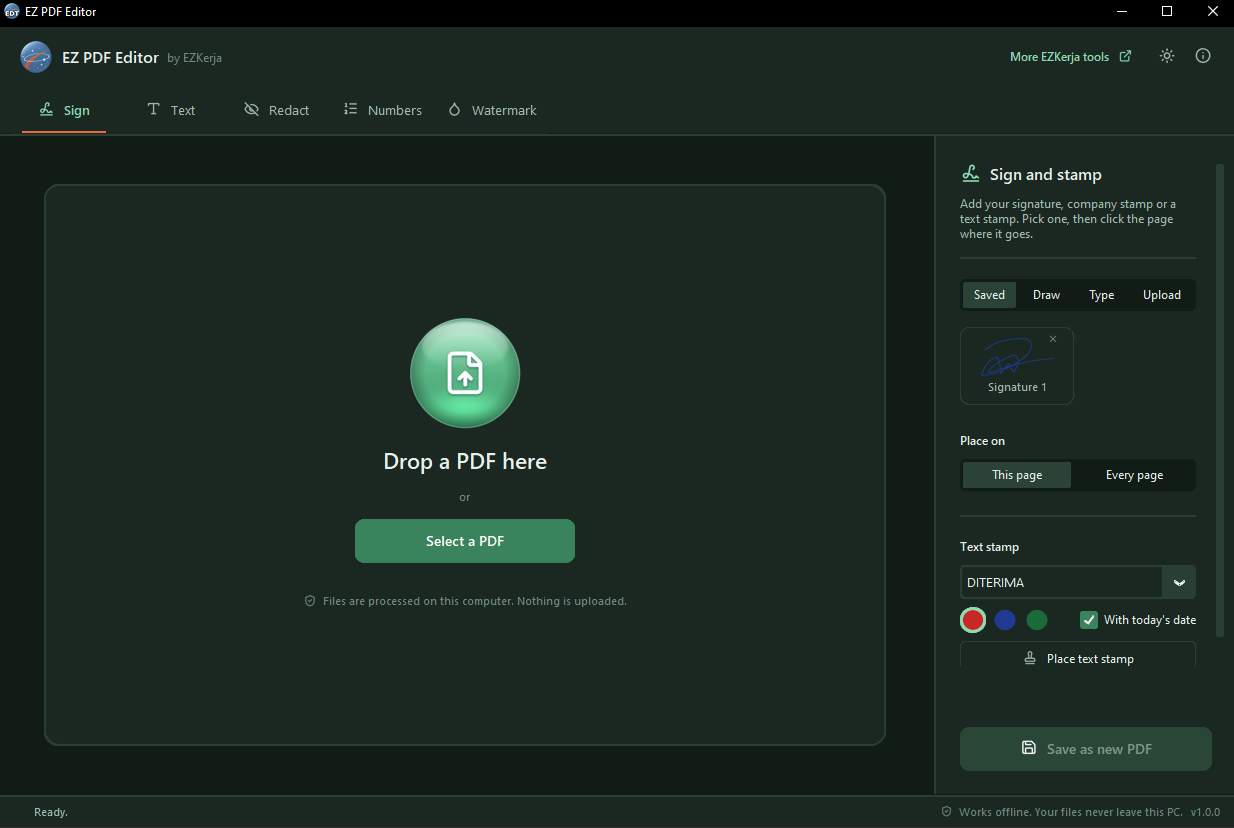
Sign, stamp, fill in, redact, number and watermark PDFs — offline, on your own PC. Nothing is uploaded. No account. Free.
Tandatangan, cop, isi borang dan hitamkan maklumat sulit terus dalam PC anda — takde upload, takde account, percuma.
Why this exists
Signing a form usually means printing it, signing it, scanning it back, and hoping the scan is straight. The quicker way — a free website — means your document leaves your PC and sits on someone else’s server. That is a bad trade for a form carrying your IC number, your salary or a client’s details.
EZ PDF Editor does it on your own computer. Your files never leave it.
It is the companion to EZ PDF Organizer: that one moves pages around, this one changes what is on them.
What it does
| Function | What it does |
|---|---|
| Sign and stamp | Draw your signature, type it, or upload a photo of it — the paper background is removed automatically. Company stamps (cop) too. Text stamps like DITERIMA, LULUS and SALINAN with today’s date. Saved for next time. |
| Add text | Click anywhere and type. Font, size, bold and colour. Ticks, crosses and today’s date in one click. Cover boxes to hide something. |
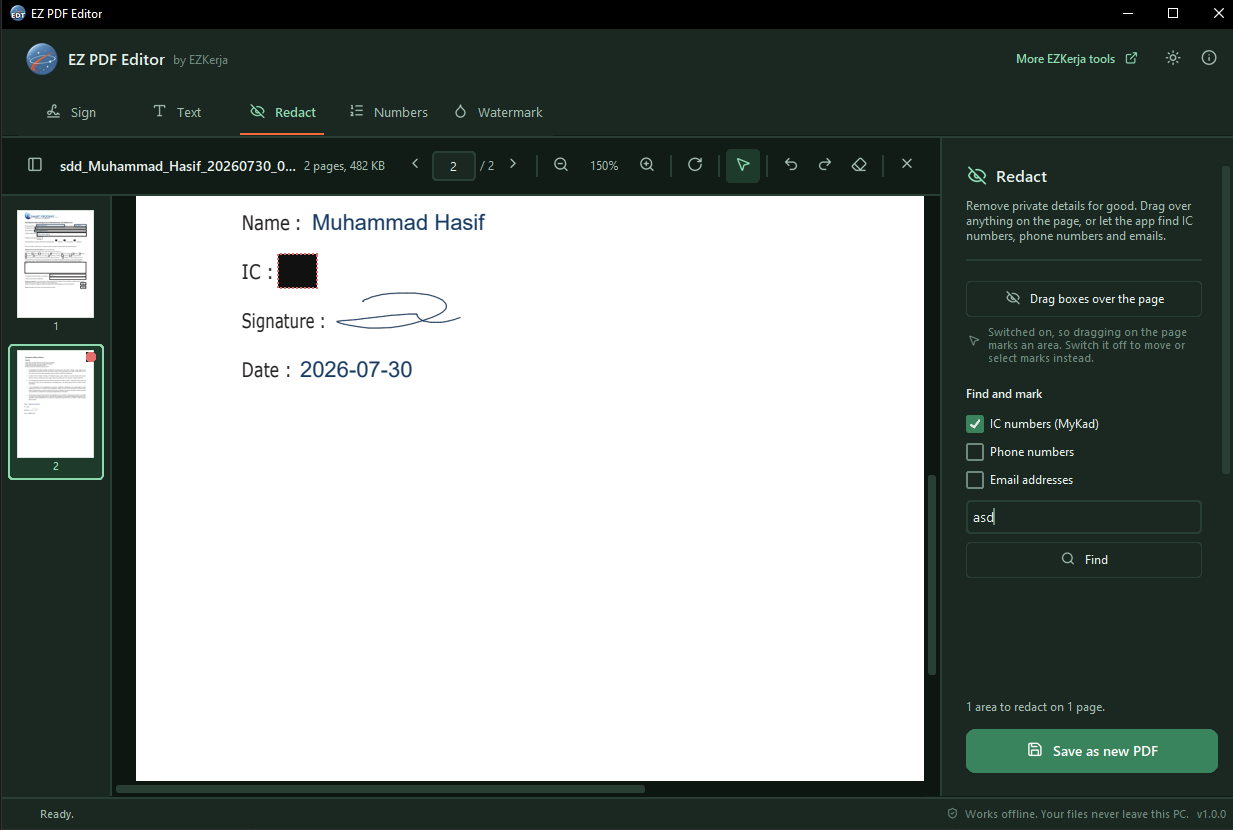
| Redact | Remove private details for good. Drag over anything, or let it find IC numbers (MyKad), phone numbers and emails. After saving, the app checks the removed text is really gone. |
| Page numbers | Six styles, including Halaman 1 daripada 12. Any corner or centre. Start from any page. |
| Watermark | CONFIDENTIAL, SULIT, SALINAN or your own word across every page. Diagonal or straight. |
What it promises
- 100% offline — no upload, no account, no tracking
- Your original file is never changed or overwritten — every result is saved as a new PDF
- Redaction that really removes — the text under a black box is deleted, not covered, and the saved file is checked for it afterwards
- Real text, not a picture — what you type stays sharp and searchable
- No file size limit from the tool
- Works without internet
- No admin rights needed — for the installer or the portable zip
- Dark mode, keyboard shortcuts, and Open with from File Explorer
Download and run
Two ways to get it. Same program, pick one.
Installer — recommended
- Click Download Installer (.exe) above.
- Double-click
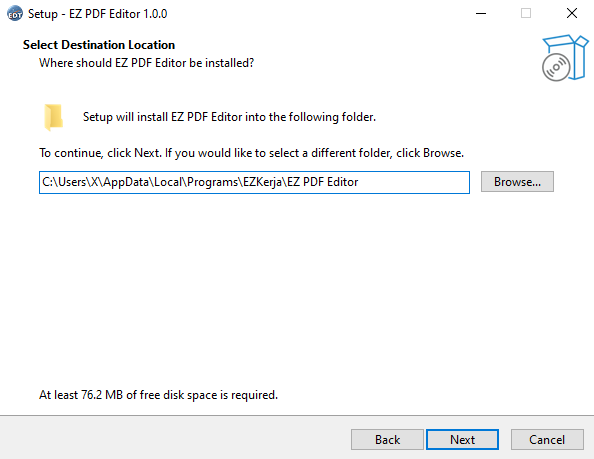
EZ-PDF-Editor-Setup-1.0.0.exe. - Click Next through the steps. It installs into your own user folder
(
AppData\Local\Programs\EZKerja), so no admin rights are needed. - When it finishes, open EZ PDF Editor from the Start menu.
Portable (zip) — nothing to install
- Click Portable (zip) above.
- Right-click the zip → Extract All.
- Open the folder and double-click
EZ PDF Editor.exe.
Keep the _internal folder next to the .exe — the program needs it. Good for a USB drive
or a PC where you would rather not install anything.
Windows protected your PC? The program is not code-signed yet, so Windows SmartScreen may warn you the first time. Click More info → Run anyway. The download box above shows how to check the file with VirusTotal and its SHA-256 fingerprint.
How to use it
- Drag a PDF into the window, or click Select a PDF.
- Pick a tool at the top — Sign, Text, Redact, Numbers or Watermark.
- Press a button such as Tick or Place text stamp, then click the page where it goes. The button stays lit until you press it again, so you can place the same thing many times. The cursor button in the toolbar switches everything off.
- Drag anything to move it, drag a corner to resize it, and press Ctrl+Z to undo.
- Click Save as new PDF.
All five tools work on the same open document, so one signature, a few ticks, a redaction and a watermark all go into the one file you save at the end.
Requirements
- Windows 10 or Windows 11 (64-bit)
- No admin rights, no internet connection
- Installer needs about 100 MB of free disk space
Honest limits
- Windows only. No Mac or Linux version.
- English and Malay text. The built-in fonts do not cover Chinese, Tamil or Jawi. If you type those, the app warns you instead of printing empty boxes.
- Redacted pages become pictures. That is what makes the removal real — but text on those pages can no longer be selected or searched. Pages you did not redact are untouched.
- PDFs locked by their owner are refused. If the person who made the PDF blocked editing, the app tells you instead of working around it.
- One PDF at a time. Stamping a whole folder at once is not in this version.
- No OCR, no converting to Word, and no page merging or splitting — that is EZ PDF Organizer.
- Not code-signed yet, so expect the SmartScreen warning above.
Cara guna (BM)
Installer (disyorkan):
- Klik Download Installer (.exe) di atas.
- Double-click
EZ-PDF-Editor-Setup-1.0.0.exe, klik Next sampai siap. Tak perlu admin rights. - Buka EZ PDF Editor dari Start menu.
Portable (zip):
- Klik Portable (zip) di atas.
- Klik kanan fail zip → Extract All.
- Buka folder, double-click
EZ PDF Editor.exe.
Lepas tu, drag fail PDF masuk dan pilih fungsi — Sign, Text, Redact, Numbers atau Watermark. Klik butang yang anda nak, kemudian klik pada muka surat untuk letakkan.
Untuk hitamkan maklumat sulit seperti nombor IC: pilih Redact, klik Find, tanda yang mana satu, dan simpan. Teks itu betul-betul dibuang daripada fail baharu, bukan sekadar ditutup hitam.
Semua kerja berlaku dalam PC anda. Fail asal tak pernah diubah — hasil sentiasa disimpan sebagai fail baru.
License
Free to use. Third-party component licences are in the licenses folder inside the zip.
Questions
Ask on WhatsApp — the button is below. Malay or English, both fine.